
Why Your Firestore Query Silently Fails in Production
Your Firestore query works perfectly in development, then breaks silently in production. No visible error, just missing data. Ebesoh Adrian explains why multi-field queries require composite indices in NoSQL, how to diagnose them, and how denormalization can make the problem disappear entirely
The Query That Works Until It Does Not
There is a particular kind of Firestore bug that is uniquely demoralising because it passes every local test. Your development environment is fast, the data is there, the query returns exactly what you expect. You deploy. You check production. The data is missing.
No error in the UI. No obvious crash. Just absence.
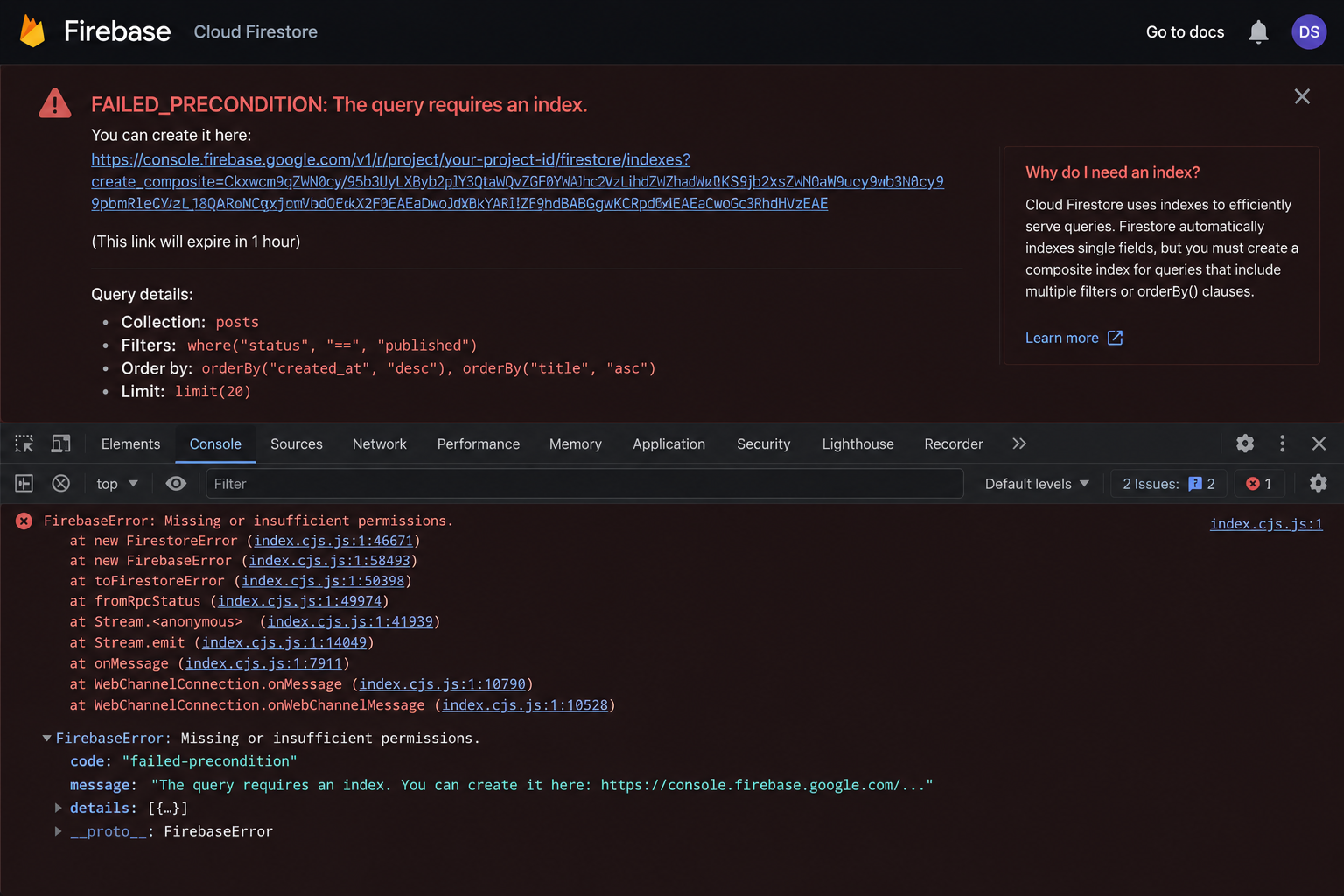
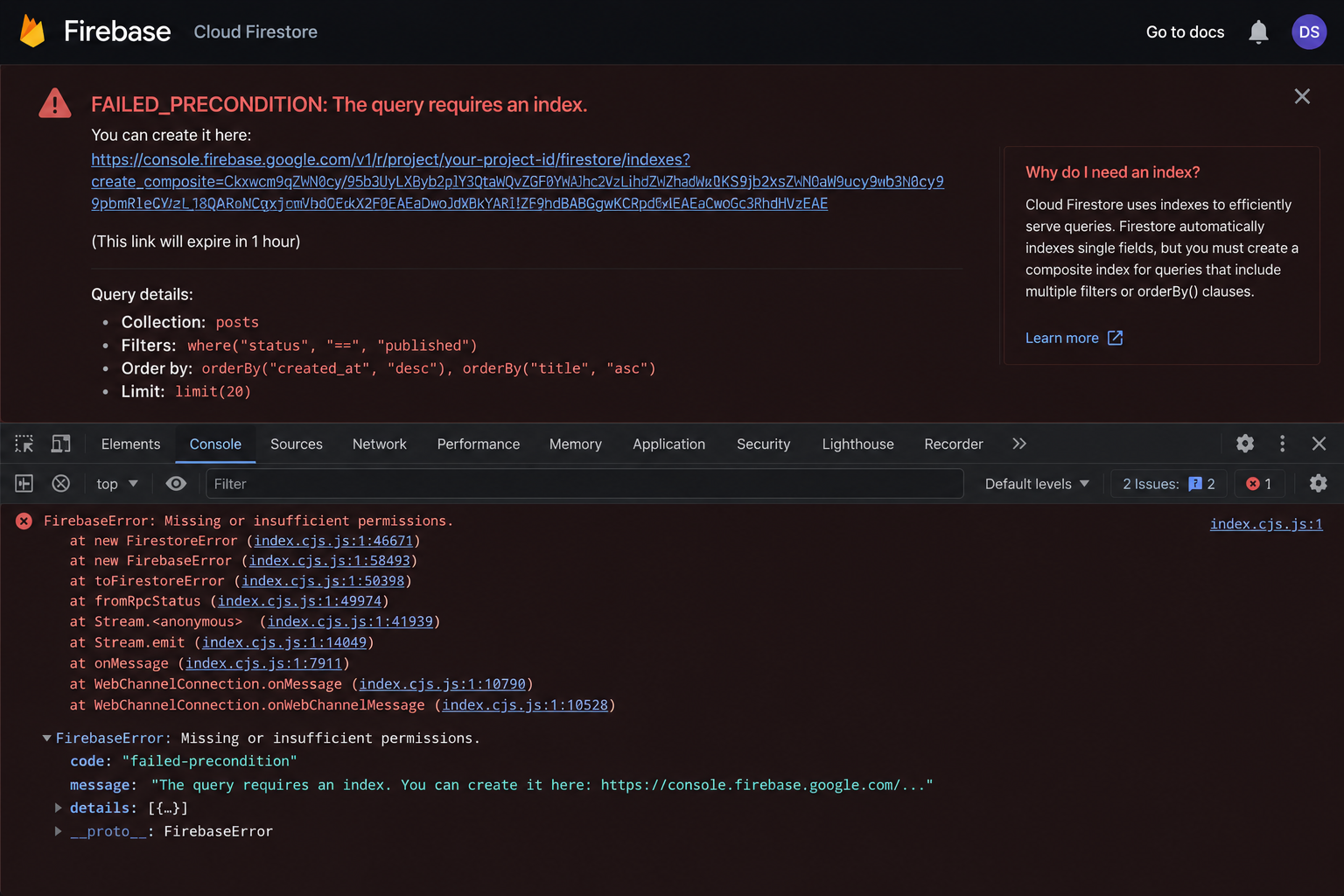
The browser console, if you know to look there, shows something like this:
FirebaseError: The query requires an index.
You can create it here: https://console.firebase.google.com/project/...
That URL is actually one of Firebase's best features — it generates the exact index you need with a single click. But to use it intelligently, and to build a data architecture that does not accumulate index debt over time, you need to understand why the error happens at all.
How Firestore Queries Actually Work
Firestore is a NoSQL document database, and its query execution model is fundamentally different from a relational database like PostgreSQL.
In PostgreSQL, you can write an arbitrary WHERE clause filtering on any combination of columns, and the query planner will figure out how to execute it — potentially doing a full table scan if necessary. This is flexible but can be slow at scale.
Firestore takes a different approach. Every Firestore query must be serviced by a pre-built index. When you query a single field, Firestore uses its automatically maintained single-field indices. When you query across multiple fields — combining where() clauses, or mixing where() with orderBy() — Firestore needs a composite index that covers exactly that combination of fields.
If the composite index does not exist, Firestore refuses to execute the query. It is not a performance issue — it is a hard requirement.
// ✅ This works — single field query, auto-indexed
const query = collection(db, "orders")
  .where("status", "==", "pending");

// ❌ This fails without a composite index
// Firestore cannot serve: filter on status AND orderBy createdAt
const query = collection(db, "orders")
  .where("status", "==", "pending")
  .orderBy("createdAt", "desc");

// ❌ This also fails without a composite index
// Multiple where() clauses on different fields require a composite index
const query = collection(db, "orders")
  .where("userId", "==", userId)
  .where("status", "==", "shipped")
  .where("region", "==", "west");
Why It Works in Development But Fails in Production
The most common reason is the Firebase Emulator Suite. The local Firestore emulator does not enforce composite index requirements. It executes queries against local data regardless of whether the corresponding index exists in the real Firestore instance.
If you test against the emulator without deploying your firestore.indexes.json, you will ship queries to production that have no corresponding index.
The second common reason: your development database has so little data that Firestore serves the query using a collection scan, which is technically possible for small datasets. Production databases with real data volumes hit the index requirement immediately.
Fix 1: Follow the Error URL and Create the Index
The fastest fix is to click the URL in the error message. Firebase's error messages for missing indices include a direct link to the Firebase Console with all the fields pre-populated. You click "Create Index", wait 30–60 seconds for it to build, and the query works.
Here is what that flow looks like in code when you are handling the error gracefully:
import {
  collection,
  query,
  where,
  orderBy,
  getDocs,
  FirebaseError,
} from "firebase/firestore";

async function getPendingOrdersForUser(userId: string) {
  const ordersRef = collection(db, "orders");

  const q = query(
    ordersRef,
    where("userId", "==", userId),
    where("status", "==", "pending"),
    orderBy("createdAt", "desc")
  );

  try {
    const snapshot = await getDocs(q);
    return snapshot.docs.map((doc) => ({ id: doc.id, ...doc.data() }));
  } catch (error) {
    if (error instanceof FirebaseError && error.code === "failed-precondition") {
      // Log the full error — it contains the index creation URL
      console.error("Missing Firestore index:", error.message);
      // In development, the message includes the URL to create the index
    }
    throw error;
  }
}
Fix 2: Define Indices in firestore.indexes.json
Clicking the Console URL is fine for quick fixes, but in a team environment you want your indices defined in code and committed to version control. This way they are deployed automatically with your application.
// firestore.indexes.json
{
  "indexes": [
    {
      "collectionGroup": "orders",
      "queryScope": "COLLECTION",
      "fields": [
        { "fieldPath": "userId", "order": "ASCENDING" },
        { "fieldPath": "status", "order": "ASCENDING" },
        { "fieldPath": "createdAt", "order": "DESCENDING" }
      ]
    },
    {
      "collectionGroup": "orders",
      "queryScope": "COLLECTION",
      "fields": [
        { "fieldPath": "region", "order": "ASCENDING" },
        { "fieldPath": "status", "order": "ASCENDING" },
        { "fieldPath": "totalAmount", "order": "DESCENDING" }
      ]
    },
    {
      "collectionGroup": "posts",
      "queryScope": "COLLECTION",
      "fields": [
        { "fieldPath": "authorId", "order": "ASCENDING" },
        { "fieldPath": "publishedAt", "order": "DESCENDING" }
      ]
    }
  ],
  "fieldOverrides": []
}
Deploy your indices with the Firebase CLI:
# Deploy only indices (not rules or functions)
firebase deploy --only firestore:indexes

# Or deploy everything
firebase deploy
Check index build status:
firebase firestore:indexes
Fix 3: Denormalization — Redesign the Data to Avoid the Query
The permanent architectural fix is often to rethink the data model so the complex query is not needed at all. This is denormalization: storing redundant data so that reads become simple.
In a relational database, you normalise to avoid data duplication. In Firestore (and NoSQL generally), you denormalise intentionally to keep reads cheap and index requirements low.
Example: Avoiding the multi-field query entirely
Instead of querying orders by userId, status, and region simultaneously, store a pre-computed bucket:
// ⛔ BEFORE: Requires a composite index for userId + status + region
interface Order {
  id: string;
  userId: string;
  status: "pending" | "shipped" | "delivered" | "cancelled";
  region: string;
  createdAt: Timestamp;
  totalAmount: number;
}

// Query requires composite index: userId + status + region + createdAt
const q = query(
  collection(db, "orders"),
  where("userId", "==", userId),
  where("status", "==", "pending"),
  where("region", "==", "west"),
  orderBy("createdAt", "desc")
);
// ✅ AFTER: Denormalized — query on a single computed field
interface Order {
  id: string;
  userId: string;
  status: "pending" | "shipped" | "delivered" | "cancelled";
  region: string;
  createdAt: Timestamp;
  totalAmount: number;
  // ✅ Pre-computed composite key — enables a single-field query
  userStatusRegion: string; // e.g., "user_abc:pending:west"
}

// When creating or updating an order:
async function createOrder(userId: string, status: string, region: string, data: Partial<Order>) {
  const orderRef = doc(collection(db, "orders"));
  await setDoc(orderRef, {
    ...data,
    userId,
    status,
    region,
    createdAt: serverTimestamp(),
    // ✅ Compute the bucket key at write time
    userStatusRegion: `${userId}:${status}:${region}`,
  });
}

// ✅ Single-field query — no composite index needed
const q = query(
  collection(db, "orders"),
  where("userStatusRegion", "==", `${userId}:pending:west`),
  orderBy("createdAt", "desc")
);
The trade-off: writes become slightly more expensive (you compute and store the key), but reads are fast, cheap, and never hit index issues.
A Practical Denormalization Checklist
Use this when designing a new Firestore data model:
For each query pattern you need, ask:
Does it filter on more than one field? → Consider a composite key or separate subcollection
Does it combine
where()withorderBy()? → You need a composite index or can you reverse the logic?Does it require range queries on multiple fields? → Firestore only supports range on one field per query — you may need denormalization
Is this query run frequently (hot path)? → Optimise aggressively with denormalization
Is this query run rarely (admin, analytics)? → A composite index is fine, or use BigQuery export
General rules:
Design for reads, not for writes. Reads are usually far more frequent.
Duplicate data intentionally. Storage is cheap. Slow reads are not.
Model your data around your query patterns, not around your entities.
Monitoring Index Usage in Production
The Firebase Console provides insight into which indices are being used and which queries are failing. Under Firestore → Indexes, you can see the status of all your composite indices.
For ongoing visibility:
// Add structured logging for Firestore errors in production
import { initializeApp } from "firebase/app";
import { getFirestore, enableIndexedDbPersistence } from "firebase/firestore";

// Log Firebase errors to your observability stack (Datadog, Sentry, etc.)
function logFirestoreError(operation: string, error: unknown) {
  if (error instanceof FirebaseError) {
    console.error(JSON.stringify({
      level: "error",
      service: "firestore",
      operation,
      code: error.code,
      message: error.message,
      timestamp: new Date().toISOString(),
    }));
  }
}
The Principle Behind the Pattern
Firestore's index requirement is not a limitation to work around — it is a design constraint that forces you to think about your query patterns before you write your first document. When you know every query at design time and build your indices (or your data model) to serve them, your database performs predictably at any scale.
The developers who struggle most with Firestore are those who approach it with a relational mindset, expecting to filter and sort on any combination of fields on demand. The developers who thrive are those who treat the data model as a first-class design decision, built around the queries they need to serve.
Always check the Firebase Console error log — it provides a direct URL to auto-generate the required index. Architecturally, prefer denormalization to avoid complex, index-heavy queries.
Resources and Further Reading
Firebase Docs — Manage Indexes in Firestore — Official guide to creating, deploying, and managing composite indices
Firebase Docs — Data Modeling — Firestore's data model explained, including subcollections and document references
Firebase Docs — Structure Data — When to use nested data, subcollections, and root-level collections
Firestore Best Practices — Official best practices including index management and query design
Firebase CLI Reference — firestore:indexes — How to deploy and inspect indices from the command line
NoSQL Data Modeling Techniques — Highly Scalable Blog — A deeper exploration of NoSQL modelling patterns including denormalization strategies
Written by Ebesoh Adrian — Fullstack Architect. Building systems that are not just correct, but coherently designed.
Keep reading
 Backend Engineering
Why Your Firestore Query Silently Fails in Production
Your Firestore query works perfectly in development, then breaks silently in production. No visible error, just missing data. Ebesoh Adrian explains why multi-field queries require composite indices in NoSQL, how to diagnose them, and how denormalization can make the problem disappear entirely.
 Guides / Tutorials (o…
How to Create Your Skilldera Account: A Step-by-Step Guide for African Creators, Affiliates, and Learners.
Ready to start selling on Skilldera? Here's a step-by-step walkthrough — from your first search to your live dashboard — covering sign-up, choosing your role, and setting up your creator storefront with Mobile Money payouts. No card, no stress — just MoMo. This guide walks you through creating your Skilldera account in minutes, whether you're joining as a Creator, Affiliate, or Student.
 Tech Education +5
What Is a Creator Platform and Why Does Cameroon Need One?
Most people in Cameroon have heard the word "platform" thrown around online. But very few understand what a creator platform actually is, what it does, and why having one built specifically for Cameroon changes everything. This is the clearest explanation you will find — and by the end, you will understand exactly why this matters for your future.