
Why Your Lambda Takes 5 Seconds and How to Fix It
Your AWS Lambda function responds in 40ms when it is warm. But after a few minutes of inactivity, the first request takes over 5 seconds. Ebesoh Adrian breaks down why cold starts happen and the architectural strategies that eliminate the pain.
The 5-Second Surprise
The demo was going perfectly. The app was fast, responsive, clean. Then the interviewer paused for a moment to take notes, came back to the browser, clicked a button — and nothing happened for five seconds.
That was my introduction to the AWS Lambda cold start problem. I had built the backend on serverless functions, which worked brilliantly under continuous load. But when a function went idle, something expensive happened before it could serve the next request.
Understanding that "something expensive" is the first step to fixing it.
What Happens During a Cold Start
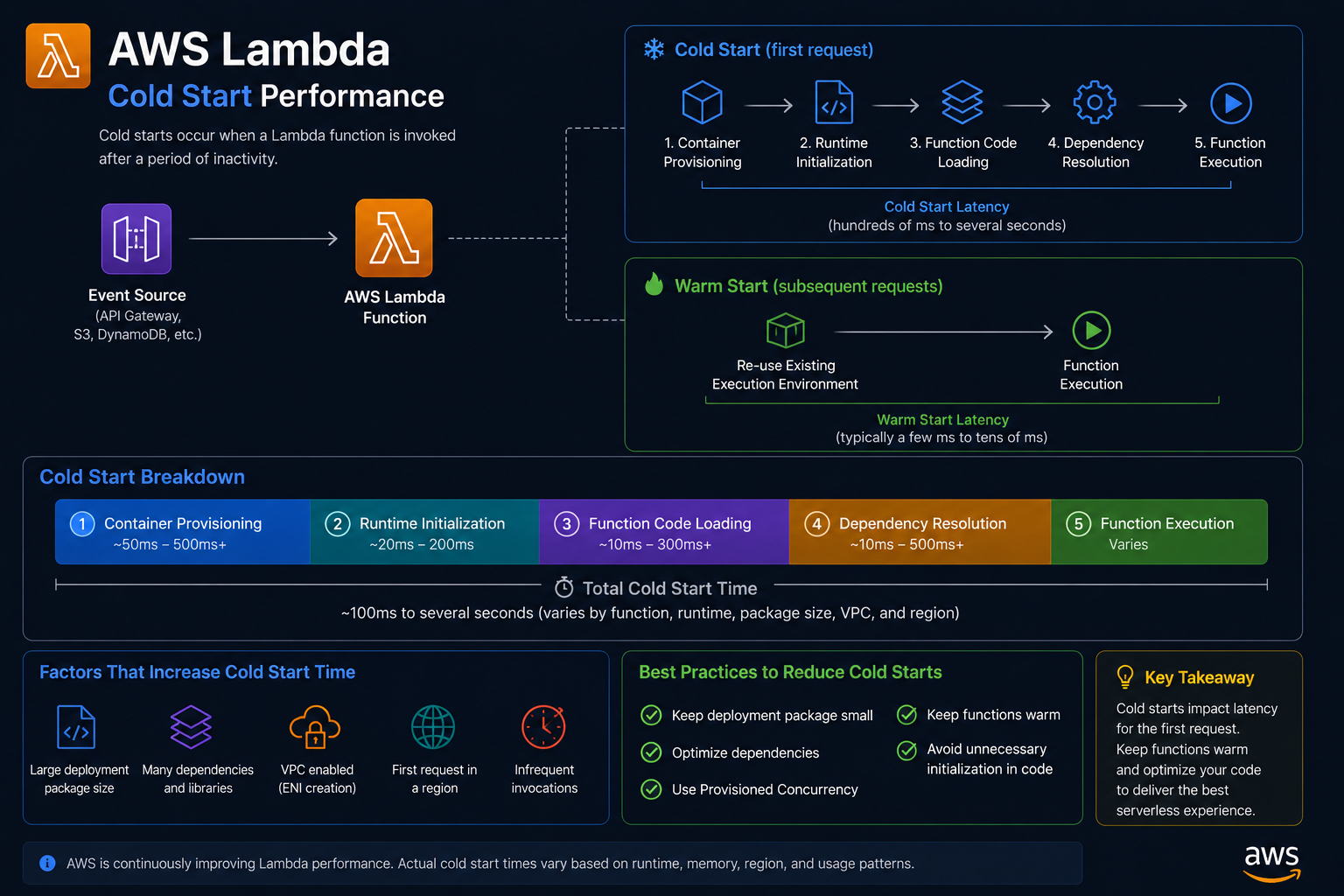
AWS Lambda runs your code inside a lightweight execution environment — essentially a containerised Linux sandbox. When a function has not been invoked recently, Lambda has to provision a fresh environment before it can run your code. This provisioning process is the cold start, and it consists of several distinct phases:
Phase 1 — Environment provisioning
AWS allocates compute resources and initialises the execution environment. This is entirely on AWS's side and cannot be directly controlled.
Phase 2 — Runtime initialisation
The Node.js runtime (or Python, Go, etc.) is loaded and started inside the environment.
Phase 3 — Package initialisation
Your deployment package (the ZIP or container image) is downloaded and extracted. This is where bundle size matters enormously.
Phase 4 — Handler module initialisation
Your code outside the handler function runs. This is where database connection pools are established, SDKs are initialised, configuration is loaded, and any startup logic executes.
Phase 5 — Handler execution
Finally, your actual handler function runs and serves the request.
Phases 1 through 4 only happen on a cold start. Phase 5 happens on every invocation. The goal is to minimise the cost of phases 3 and 4 — the parts you control.
A typical breakdown of cold start time for a Node.js Lambda with heavy dependencies:
Phase Approximate Time Environment provisioning 200–400ms (AWS-controlled) Runtime initialisation 50–100ms Package initialisation 500ms–3s (your dependency tree) Handler module initialisation 200ms–2s (your startup code) Total cold start ~1s–5s+
Warm invocations skip to Phase 5 and typically run in 20–200ms.
Fix 1: Move Initialisation Outside the Handler
This is the highest-leverage change and it is free. Code that runs at the module level (outside your handler function) is executed once during the cold start and then cached for the lifetime of the execution environment. Warm invocations reuse the already-initialised resources.
// ⛔ THE ANTI-PATTERN: Connection is created on EVERY invocation
import { DynamoDBClient } from "@aws-sdk/client-dynamodb";
import { DynamoDBDocumentClient } from "@aws-sdk/lib-dynamodb";

export const handler = async (event: APIGatewayEvent) => {
  // ⛔ This creates a new connection pool on every invocation (including warm ones!)
  const dynamoClient = new DynamoDBClient({ region: "us-east-1" });
  const docClient = DynamoDBDocumentClient.from(dynamoClient);

  const result = await docClient.get({
    TableName: "Users",
    Key: { userId: event.pathParameters?.userId },
  });

  return { statusCode: 200, body: JSON.stringify(result.Item) };
};
// ✅ THE FIX: Initialise once at module level, reuse across warm invocations
import { DynamoDBClient } from "@aws-sdk/client-dynamodb";
import { DynamoDBDocumentClient, GetCommand } from "@aws-sdk/lib-dynamodb";

// ✅ Runs ONCE on cold start, then cached
const dynamoClient = new DynamoDBClient({ region: "us-east-1" });
const docClient = DynamoDBDocumentClient.from(dynamoClient);

export const handler = async (event: APIGatewayEvent) => {
  // ✅ docClient is already initialised — reused from module-level cache
  const result = await docClient.send(new GetCommand({
    TableName: "Users",
    Key: { userId: event.pathParameters?.userId },
  }));

  return { statusCode: 200, body: JSON.stringify(result.Item) };
};
This applies to any initialisation-heavy resource: database connection pools, SDK clients, configuration loaders, secret fetchers, and any third-party library that has a setup phase.
Fix 2: Tree-Shake Your Dependencies Aggressively
The AWS SDK v3 was redesigned specifically for Lambda cold start performance. Unlike v2, which was a monolithic package, v3 uses a modular architecture where you only import the exact client and commands you need.
// ⛔ AWS SDK v2 — imports the entire SDK (~7MB+)
const AWS = require("aws-sdk");
const s3 = new AWS.S3();
const dynamo = new AWS.DynamoDB.DocumentClient();

// ✅ AWS SDK v3 — import only what you need
import { S3Client, GetObjectCommand } from "@aws-sdk/client-s3"; // ~200KB
import { DynamoDBDocumentClient, GetCommand } from "@aws-sdk/lib-dynamodb"; // ~150KB
The difference in cold start time from this change alone can be 500ms to 1.5 seconds on a Node.js Lambda.
Apply the same principle to all dependencies. Audit your bundle size with a tool before deploying:
# Install esbuild for fast bundling analysis
npm install --save-dev esbuild

# Build and output bundle size stats
npx esbuild src/handler.ts \
  --bundle \
  --platform=node \
  --target=node18 \
  --outfile=dist/handler.js \
  --metafile=dist/meta.json

# Analyse what is in your bundle
npx esbuild-visualizer --metadata dist/meta.json --open
Target a bundle size under 5MB for consistent cold starts under 1 second. Under 1MB is ideal.
Fix 3: Memory Tiering Gives You More CPU
This one surprises a lot of people. Lambda allocates CPU proportionally to memory. A 128MB Lambda gets a fraction of a vCPU. A 1792MB Lambda gets a full vCPU. A 10,240MB Lambda gets six vCPUs.
The cold start initialisation phase is CPU-bound: it involves parsing JavaScript, establishing network connections, and loading modules. More CPU means this phase completes faster.
128MB  Lambda:  ~80ms  package init time, 0.08 vCPU
512MB  Lambda:  ~40ms  package init time, 0.33 vCPU
1792MB Lambda:  ~15ms  package init time, 1 full vCPU
The cost difference is linear (more memory = more cost per GB-second), but the performance improvement is often worth it, especially for user-facing APIs. Run your own benchmarks with AWS Lambda Power Tuning (linked in resources below).
// SAM / CloudFormation configuration
{
  "MyFunction": {
    "Type": "AWS::Serverless::Function",
    "Properties": {
      "Handler": "dist/handler.handler",
      "Runtime": "nodejs18.x",
      "MemorySize": 1024,
      "Timeout": 30,
      "Environment": {
        "Variables": {
          "NODE_ENV": "production"
        }
      }
    }
  }
}
Fix 4: Provisioned Concurrency for Critical Paths
For endpoints where cold start latency is completely unacceptable — a checkout flow, a real-time API, a public-facing product page — AWS Provisioned Concurrency keeps a pool of pre-warmed execution environments ready.
# AWS CLI — provision 5 warm instances of your function
aws lambda put-provisioned-concurrency-config \
  --function-name my-api-function \
  --qualifier production \
  --provisioned-concurrent-executions 5
Provisioned Concurrency has an additional cost (you pay for the warm instances even when idle), so use it selectively on the functions that directly impact user experience rather than applying it globally.
Fix 5: Use ARM64 (Graviton2) Architecture
AWS Graviton2 processors (ARM64) offer roughly 20% better price-performance compared to x86 for most Lambda workloads, including faster cold starts.
# serverless.yml
provider:
  name: aws
  runtime: nodejs18.x
  architecture: arm64  # ✅ Graviton2 — faster and cheaper per GB-second

functions:
  api:
    handler: dist/handler.handler
    memorySize: 1024
The code change required: none, assuming you are using Node.js or Python. The only consideration is that any native Node.js modules (.node binary addons) must be compiled for ARM64.
Putting It All Together: An Optimised Lambda Function
Here is a production-ready handler that applies all of these principles:
// handler.ts
import { DynamoDBClient } from "@aws-sdk/client-dynamodb";
import { DynamoDBDocumentClient, GetCommand, PutCommand } from "@aws-sdk/lib-dynamodb";
import { SecretsManagerClient, GetSecretValueCommand } from "@aws-sdk/client-secrets-manager";
import type { APIGatewayProxyHandlerV2 } from "aws-lambda";

// ✅ All clients initialised at module level — cached across warm invocations
const dynamo = DynamoDBDocumentClient.from(
  new DynamoDBClient({ region: process.env.AWS_REGION })
);

const secrets = new SecretsManagerClient({
  region: process.env.AWS_REGION,
});

// ✅ Config loaded once — not on every invocation
let appConfig: Record<string, string> | null = null;

async function getConfig() {
  if (appConfig) return appConfig; // Return cached config on warm invocations

  const secret = await secrets.send(
    new GetSecretValueCommand({ SecretId: process.env.CONFIG_SECRET_ID })
  );

  appConfig = JSON.parse(secret.SecretString ?? "{}");
  return appConfig;
}

export const handler: APIGatewayProxyHandlerV2 = async (event) => {
  const config = await getConfig(); // Fast on warm starts (returns cached value)

  const userId = event.pathParameters?.userId;

  if (!userId) {
    return { statusCode: 400, body: JSON.stringify({ error: "Missing userId" }) };
  }

  const result = await dynamo.send(new GetCommand({
    TableName: process.env.USERS_TABLE,
    Key: { userId },
  }));

  return {
    statusCode: 200,
    headers: { "Content-Type": "application/json" },
    body: JSON.stringify(result.Item),
  };
};
The Architecture Principle
Lambda cold starts are a reminder that serverless does not mean zero infrastructure concerns — it means different infrastructure concerns. You give up control of the machine but gain elastic scaling. The trade-off requires you to think carefully about initialisation cost.
The golden rule: anything that takes time at startup and can be reused across invocations should live outside the handler. The execution environment is your implicit application server. Treat it like one.
Resources and Further Reading
AWS Lambda — Cold Starts in VPC — How VPC configuration affects cold start times
AWS Lambda Power Tuning — Open-source tool to find the optimal memory/cost configuration for your function
AWS SDK for JavaScript v3 — Migration Guide — How to move from the monolithic v2 to modular v3
Provisioned Concurrency — AWS Docs — Configuration, pricing, and when to use it
esbuild — Bundler — The fastest JavaScript bundler for Lambda deployments
Graviton on Lambda — AWS Blog — Official announcement and benchmarks for ARM64 Lambda
Written by Ebesoh Adrian — Fullstack Architect. Building systems that are not just correct, but coherently designed.
Keep reading
 Guides / Tutorials (o…
How to Create Your Skilldera Account: A Step-by-Step Guide for African Creators, Affiliates, and Learners.
Ready to start selling on Skilldera? Here's a step-by-step walkthrough — from your first search to your live dashboard — covering sign-up, choosing your role, and setting up your creator storefront with Mobile Money payouts. No card, no stress — just MoMo. This guide walks you through creating your Skilldera account in minutes, whether you're joining as a Creator, Affiliate, or Student.
 Tech Education +5
What Is a Creator Platform and Why Does Cameroon Need One?
Most people in Cameroon have heard the word "platform" thrown around online. But very few understand what a creator platform actually is, what it does, and why having one built specifically for Cameroon changes everything. This is the clearest explanation you will find — and by the end, you will understand exactly why this matters for your future.
 Student Founders +5
Why We Built Skilldera in Cameroon — The Story Behind Africa's Creator Platform
Most platforms were not built for us. The payments didn't work. The language wasn't ours. The infrastructure assumed we had what we didn't. So we stopped waiting for someone else to solve it — and built Skilldera. This is the story of why, and what we're building for every knowledge seller in Cameroon and beyond.