Mastering the MERN Stack in 2026: The Ultimate Guide to Scalable Full-Stack Apps
Discover why the MERN stack (MongoDB, Express, React, Node.js) remains the undisputed king of full-stack development. From rapid prototyping to AI-native integration, learn how to build production-ready applications with a unified JavaScript ecosystem.
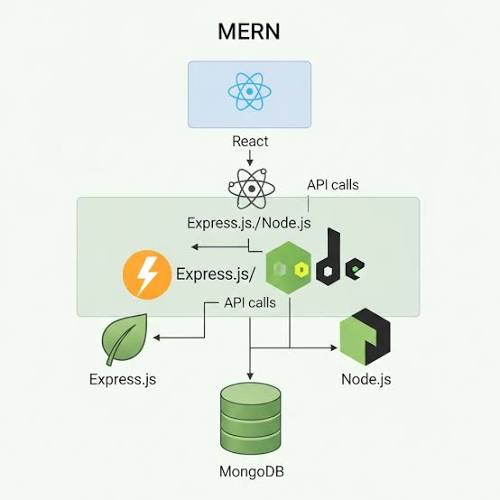
In the fast-evolving world of web development, the MERN Stack—comprised of MongoDB, Express.js, React, and Node.js—has stood the test of time. In 2026, it isn't just a popular choice for beginners; it’s a high-performance ecosystem for building globally distributed, AI-ready applications.
1. Breaking Down the Stack
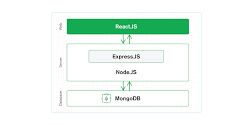
MongoDB (The Database): A NoSQL, document-oriented database that stores data in JSON-like BSON format. Its schema flexibility allows for rapid iteration, making it ideal for startups.
Express.js (The Backend Framework): A lightweight framework for Node.js that handles server-side logic and API routing with minimal overhead.
React (The Frontend Library): Known for its component-based architecture and Virtual DOM, React allows developers to build highly interactive and reusable UIs.
Node.js (The Runtime): The engine that lets you run JavaScript on the server, ensuring a unified codebase across the entire application.
2. Why MERN is Dominant in 2026
Unified TypeScript Ecosystem: In 2026, TypeScript is considered mandatory for professional MERN development. It provides end-to-end type safety from your database schema to your UI components.
AI-Native & Vector Ready: Modern MERN apps now leverage MongoDB Atlas Vector Search as a core component, making it the primary stack for building Agentic AI and RAG (Retrieval-Augmented Generation) applications.
Edge-First Performance: With React Server Components (RSC) and Edge-optimized Node.js, logic is run closer to the user, achieving sub-50ms response times globally.
3. Building for Production: Beyond CRUD
While simple CRUD (Create, Read, Update, Delete) apps are great for learning, an advanced MERN project focuses on scalability and security:
Architecture: Use the Service/Repository pattern to separate business logic from database operations.
Security: Implement
HttpOnlycookies for JWT storage and use middleware like Helmet.js to protect against common web vulnerabilities.Optimization: Use Redis for caching read-heavy data and implement indexing in MongoDB to ensure lightning-fast queries.
Conclusion
The MERN stack has evolved from a standard web framework into a resilient, high-performance toolkit for the modern age. Whether you are building a Sleek Portfolio, a Real-time Chat App, or an AI-Powered CMS, MERN provides the flexibility and community support to bring your ideas to life.
For a production-ready MERN stack blog, you should organize your code into a monorepo structure. This allows you to manage the frontend and backend in a single repository while keeping their dependencies and logic strictly separated. [1, 2]
Recommended File Structure.
mern-blog-project/
├── client/ # React Frontend (Vite + TS)
│ ├── public/ # Static assets (favicons, manifest)
│ ├── src/
│ │ ├── components/ # Reusable UI (Navbar, PostCard, Button)
│ │ ├── hooks/ # Custom hooks (useAuth, useFetchPosts)
│ │ ├── pages/ # Route components (Home.tsx, PostDetail.tsx)
│ │ ├── services/ # API call definitions (axios instances)
│ │ ├── store/ # State management (Redux Toolkit/Zustand)
│ │ ├── types/ # TypeScript interfaces for the frontend
│ │ └── App.tsx # Main router and layout entry
│ └── vite.config.ts # Vite configuration
│
├── server/ # Node/Express Backend
│ ├── src/
│ │ ├── config/ # DB connection & env variable loading
│ │ ├── controllers/ # Request handlers (postController.ts)
│ │ ├── middleware/ # Auth (JWT) & error handlers
│ │ ├── models/ # Mongoose schemas (Post.ts, User.ts)
│ │ ├── routes/ # Endpoint definitions
│ │ └── utils/ # Helpers (token generators, validators)
│ ├── .env # Secrets (MONGO_URI, JWT_SECRET)
│ └── server.ts # Entry point: Express app & DB connection
│
├── shared/ # (Optional) Shared TS types for both client & server
├── package.json # Root scripts to run both apps simultaneously
└── README.md
Essential Backend Snippet (Post Model) [1]
A standard Mongoose schema for your blog posts should include validation and timestamps. [1, 2]
typescript
// server/src/models/Post.ts
import mongoose, { Schema } from 'mongoose';

const postSchema = new Schema({
  title: { type: String, required: true, trim: true },
  slug: { type: String, required: true, unique: true },
  content: { type: String, required: true },
  author: { type: Schema.Types.ObjectId, ref: 'User', required: true },
  coverImage: { type: String }, // URL to image
  tags: [String],
}, { timestamps: true });

export default mongoose.model('Post', postSchema);
Use code with caution.
Root Automation Script
To start both the client and server with a single command, use the concurrently package in your root package.json: [1, 2]
json
"scripts": {
  "start": "concurrently \"npm run server --prefix server\" \"npm run dev --prefix client\""
}
Resources.
1. Visuals & Media (Free)
High-Resolution Tech Photos: Use sites like Unsplash or Pexels for sleek, high-quality cover images of workspaces, code, or hardware.
Developer Illustrations: For a modern "startup" look, use unDraw (fully customizable SVG illustrations) or Storyset, which allows you to animate your graphics before downloading.
Icons: FontAwesome and Lucide React are standard for MERN apps, providing consistent, lightweight icons for your UI. [2, 3, 4, 5]
2. Code Display & Management
Syntax Highlighting: To make code snippets readable, integrate highlight.js or PrismJS. For React specifically, use React Syntax Highlighter for better performance.
Code Sharing: Embed CodePen or CodeSandbox links so readers can interact with your live code examples directly in the browser.
Snippet Management: Use tools like Masscode (open-source) to organize and export your personal library of recurring code blocks. [6, 7, 8]
3. Content Inspiration & Documentation
Community Forums: Stay updated and find trending topics on DEV Community or the Hashnode developer blogging network.
Official Docs: Always link back to the source of truth, such as MDN Web Docs for JavaScript or the React Documentation for frontend best practices.
GitHub Repos: Curated lists like Awesome MERN Stack are goldmines for discovering new libraries and project ideas. [9, 10, 11, 12]
4. Performance & Utility Libraries
Images: Use Cloudinary or Imgur API to host and serve blog images efficiently without slowing down your MongoDB instance.
SEO & Analytics: Integrate Next.js (if you decide to upgrade from standard React) for better SEO, or use Google Search Console to track which blog posts perform best. [11, 13]
Would you like me to help you write a specific tutorial on one of these tools, or do you need a ready-to-use footer component with these links?
[2] https://dev.to
[4] https://dev.to
[10] https://svitla.com
Keep reading
 Guides / Tutorials (o…
How to Create Your Skilldera Account: A Step-by-Step Guide for African Creators, Affiliates, and Learners.
Ready to start selling on Skilldera? Here's a step-by-step walkthrough — from your first search to your live dashboard — covering sign-up, choosing your role, and setting up your creator storefront with Mobile Money payouts. No card, no stress — just MoMo. This guide walks you through creating your Skilldera account in minutes, whether you're joining as a Creator, Affiliate, or Student.
 Tech Education +5
What Is a Creator Platform and Why Does Cameroon Need One?
Most people in Cameroon have heard the word "platform" thrown around online. But very few understand what a creator platform actually is, what it does, and why having one built specifically for Cameroon changes everything. This is the clearest explanation you will find — and by the end, you will understand exactly why this matters for your future.
 Student Founders +5
Why We Built Skilldera in Cameroon — The Story Behind Africa's Creator Platform
Most platforms were not built for us. The payments didn't work. The language wasn't ours. The infrastructure assumed we had what we didn't. So we stopped waiting for someone else to solve it — and built Skilldera. This is the story of why, and what we're building for every knowledge seller in Cameroon and beyond.